AnyCam Software: Overview, Alternatives
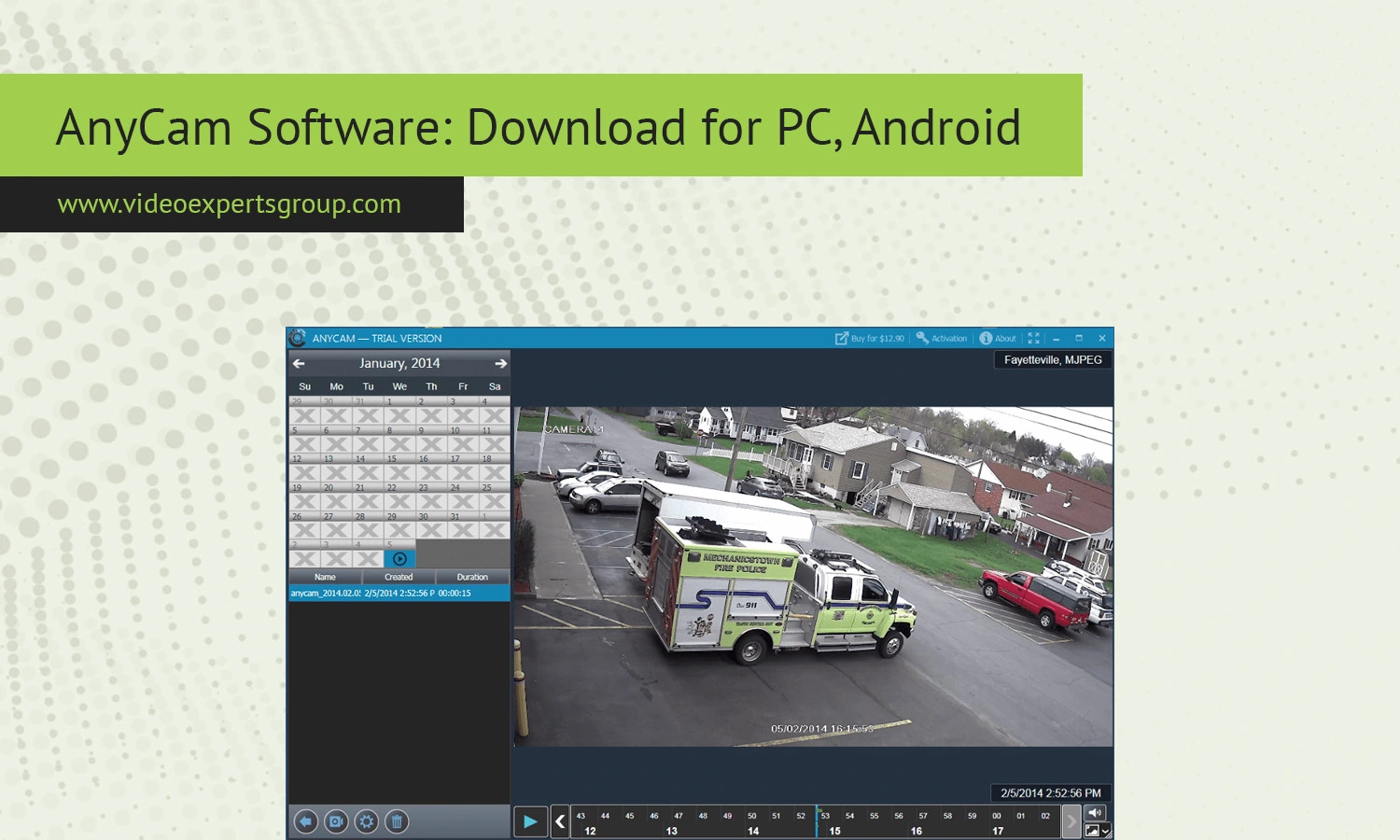
AnyCam is a free, lightweight viewing utility for any IP camera that's designed for those users, who would prefer not to have to deal with the lengthy and complicated configurations needed to be able to watch your IP camera feed directly from a webcam or from a network camera. This means that if you need to watch your home, your office or a remote site, using the AnyCam viewing program would be easy for such needs. Here, we explain what AnyCam is and how it works, as well as alternative programs to consider:
About AnyCam
AnyCam is a desktop application designed for connecting to IP cameras that support protocols like RTSP, HTTP, etc. AnyCam is commonly used by people or smaller businesses who are simply looking for a simple camera viewer without the complexity of expensive and proprietary surveillance systems. Key emphasis points of this software are it's simplicity, ease of use, so one can quickly add live camera streams into the Clean UI of the application to then immediately view those.
Unlike VMS solutions with more in depth technical knowledge as prerequisites, AnyCam is quite easy to add cameras in with simple copy paste the IP Camera URLs directly, but also has Auto Detect as well for you to benefit from.
It's definitely an entry level level Software but also has advanced options for more refined setups.
Features
A nice thing about AnyCam is that it strikes a good balance between ease of use and features. It handles streaming of multiple IP cameras and puts them all in one dashboard view for your convenience, which should also help you to manage monitoring multiple feeds at the same time since the layout isn’t messy. If your IP camera has RTSP stream access, then you can also use AnyCam for pretty much any model since the software only requires a compatible URL to get the job done.
Additionally, this tool allows simple recording functionality and saves all footage to your computer which means you can playback and review recorded video later – so while it won't replace your full on security system, it does fill that basic gap.
Snapshots are also a part of this package, which should also come in handy at some point whether for record-keeping or quick share functions from your surveillance feed – and on top of it all, Anything goes run pretty much any standard PC and you won’t need any high-performance computer either to get a smooth experience. AnyCam also comes with added security as this is a not cloud-based application, thus giving you the opportunity to have even more privacy for your feeds, provided that you have adequate passwords for their cameras and ensure the firmware.
Compatibility
AnyCam is mainly intended to run as a desktop app on Windows PCs. It is compatible with many brands of IP cameras and can connect using most standard streaming protocols including RTSP and MJPEG. This compatibility makes it work with both home consumer camera setups as well as professional camera installs.
On mobile AnyCam is missing a full featured native Android version to match the desktop functionality but stream capture is still possible for Android users with third-party apps or direct device support.
I feel this is something that prospective customers should be aware of, especially if using a mobile device for the primary point of surveillance watching. System requirements wise AnyCam does not consume many system resources; in fact it appears to perform quite well even with many IP cameras feeding into the software even on average specification PC systems, although performance can obviously decrease with an increase in cameras and stream resolutions.
AnyCam Alternatives
If Anycam doesn't totally satisfy you, there are a few other good choices to consider. Some are loaded with extra features like cloud recording, analytics or have a mobile-first approach.
VXG Player is frequently suggested to people wanting reliable IP camera streaming, and with a modern interface. It runs on all platforms and you can easily scale it if you want to upgrade your camera system.
VLC media player is yet another very common recommendation. The application is free, open source and runs RTSP streams. It doesn't have any surveillance features but if it is the only thing needed, it works perfectly fine.
ISpy Agent DVR offers much more features than the previously suggested ones. Motion detection, record plans, remote access and much more; if you are looking for an advanced surveillance solution, these options are ideal.
ONVIF Device Manager helps with the discovery of ONVIF compliant cameras as well as configuration. It is a much more technical approach but may be helpful for troubleshoots if the camera is not connecting.
There are certainly several excellent applications so the best ones depend on whether you want a more advanced software or simply a mobile-ready tool.
FAQs
