SADP Tool: Overview, Troubleshooting, Alternatives
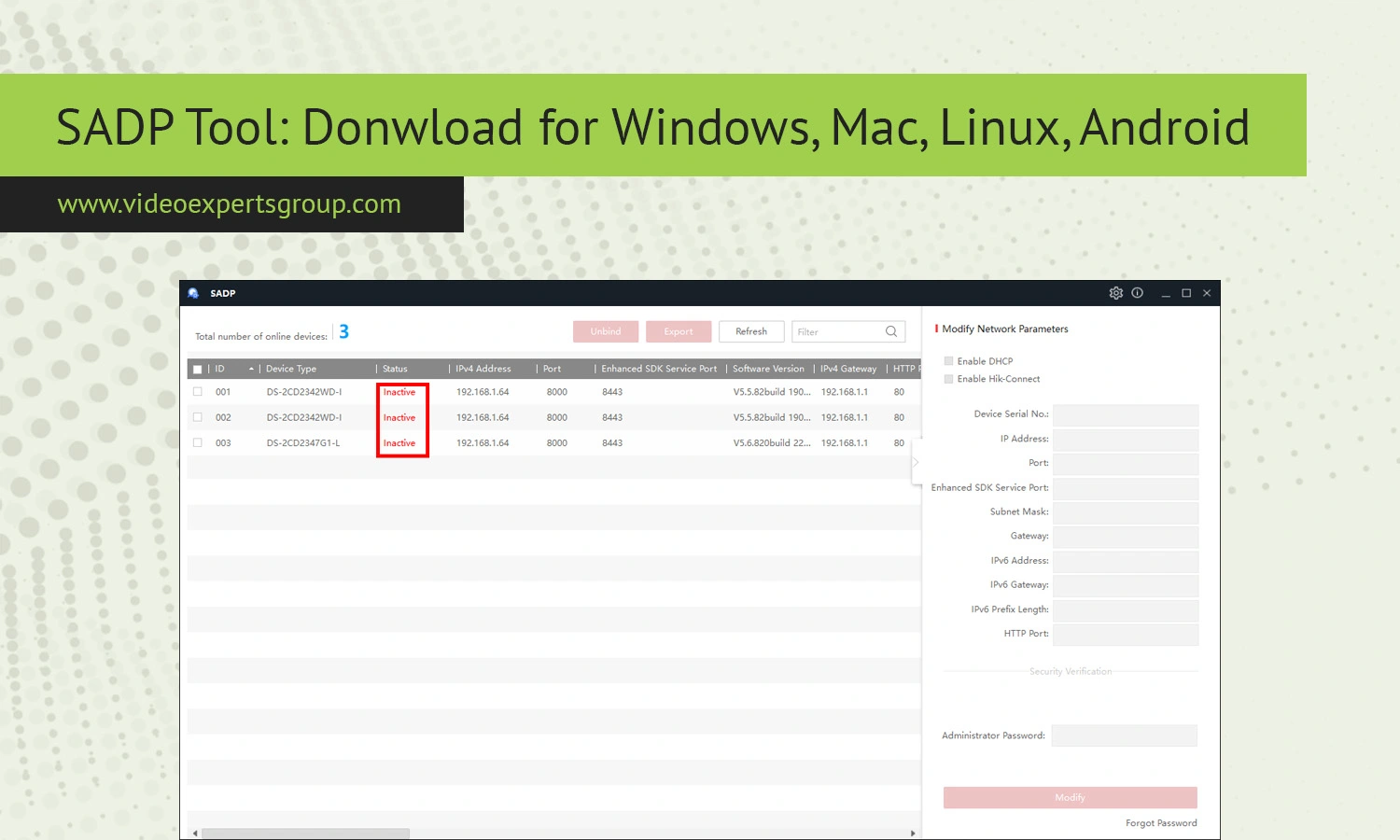
The SADP tool is arguably the most popular application to detect IP cameras on a local network. Even if you are setting up only a few home cameras or if you are setting up a major commercial surveillance system, it saves the technicians time to search and initiate cameras. Originally it was meant to run with Hikvision devices only but more and more IT professionals utilize it to fix and activate devices when things don't work properly.
If you are trying to set up a new NVR, DVR or an IP camera from any of these manufacturers you will probably end up searching for the SADP Tool. The reason for this is that by default new CCTV equipment doesn’t work on a network out of the box because network cards are not configured and need an IP address. If there’s no IP configuration the recording system will not be able to "see" your camera nor connect to it with an app on your mobile. SADP Tool finds all cameras in the local network and displays them with all of their properties in less than a second.
What Is a SADP Tool?
SADP tool stands for Search Active Devices Protocol. It is a free and simple network utility to search surveillance devices attached to the same local segment of a network. The utility is typically found being used with products made by Hikvision, including IP cameras, DVRs, NVRs, video intercom systems, and access controls.
The tool works automatically when it’s launched, listing all devices on the segment and showing the IP addresses, subnet mask, gateway, serial numbers, and firmware versions of all connected devices. Installers can easily set up or reconfigure network cameras or other devices without having to browse network router menus or access cumbersome command line tools.
The main function of the SADP Tool is to activate devices. In order to prevent unauthorized access and theft of Hikvision security equipment, all new Hikvision IP cameras, DVRs and NVRs must be activated by a user-created administrator password before the device can be configured and used for viewing surveillance footage or controlling other security features.
The software can also be used to address IP address conflicts. For instance, if several network cameras are assigned the same IP address, this can result in a network configuration error which prevent those cameras or other devices from functioning. With SADP you can easily scan your network, identify any devices with identical IP addresses and quickly reassign IP addresses without complicated network configuration.
While SADP is designed to be used primarily with Hikvision products, you might also see some other brand devices in the search results if those OEM devices are produced using Hikvision’s technology and firmware.
Features
Automatic Device Discovery
SADP Tool's main function-Automatic network scanning Once started, SADPTool automatically scans for support devices on the current subnet and then displays a list of them. So, it avoids to do IP range scanning by yourself.
Device Activation
New Hikvision cameras normally remain offline until an administrator account and password have been created. SADP provides an easy-to-use interface to activate devices and walk through the process.
IP Address Configuration
This enables users to alter network parameters like the IP address, subnet mask, default gateway, and port numbers of your IP network devices. This tool is great when incorporating new IP devices into an already established CCTV surveillance system network.
Password Reset Support
To get password reset with forgotten login credential SADP can do the work but with an Export XML file (for some firmwares and security policies) and needs the key for reset from manufacturer/reseller.
Firmware Information
It identifies the device model and the firm ware version of the device so that you can locate the older versions which may need to be updated.
Batch Configuration
Most of professional installation will use dozens or even hundreds cameras in same time. SADP tool could achieve batch active and configuration functions to help engineers save setup time greatly.
Real-Time Status Monitoring
Real-Time Scan Updating Tool updates scan results in real time as your network device connect and disconnect the network you monitor their activity live on scan window.
Lightweight Installation
Compared with the fully integrated surveillance management system, SADP is a relatively light application. It requires a few resources on the computer and does not create significant performance impact when running on an older machine.
Common Problems and Troubleshooting
No Devices Found
If your software doesn’t discover any devices, check that the computer you are running the software from and the cameras are all in the same network segment.
Managed switches, VLAN setups and firewall rules could prevent the discovery of your devices. Another thing to do is temporarily disable any VPN software, as there are many VPN clients which block local subnet scanning.
Activation Failed
A common reason activation fails is because the password does not meet the firmware's password policy. Most new Hikvision devices demand a secure password (uppercase/lowercase letters, numbers, special characters).
IP Address Conflict
Duplicate IP Addresses can stop your devices from connecting to the network correctly. Use the SADP tool and give your devices unique static IP addresses to ensure they can be reached without conflict.
Software Does Not Launch
Operating System Security / Antivirus: The operating system’s security features and/or antivirus may prevent the program from running. Running the installer as Administrator usually fixes this.
Password Reset Issues
Certain firmwares also may need help from technical support to assist in the reset process (specifically if the password is required to proceed through device setup) The XML Export may also vary slightly in functionality by device generations and/or locale specific firmware restrictions.
Why Installers Use SADP
Another reason the SADP tool is popular among CCTV installers is that it saves installation time. Without it, the technician would have to manually look for each device in their routers DHPC Table, or on their command line scanner to ensure the system is not set to an incorrect IP, or was already installed to be configured later, etc.
If a camera ever changed its IP, or the camera itself somehow failed to turn on the router or failed to get an IP address, you could use the SADP tool to help find it.
Finally, security benefits include, finding an out-of-service or not-yet-activated camera, that requires to be setup and have a password to be protected.
SADP Tool Alternatives
Despite being a favored utility in the Hikvision world, it is possible to find brand-specific device discovery software like ConfigTool from Dahua and AXIS IP Utility from Axis. Generic IP scanners can even aid you in finding surveillance devices, like Angry IP Scanner and Advanced IP Scanner, although these won’t offer the ability to activate or reset devices. Nonetheless, it continues to be one of the most known surveillance tools, primarily due to the fact it’s relatively simple and easy to use.
FAQs
