Wansview Cloud App: Download for PC/Windows, Android, iOS
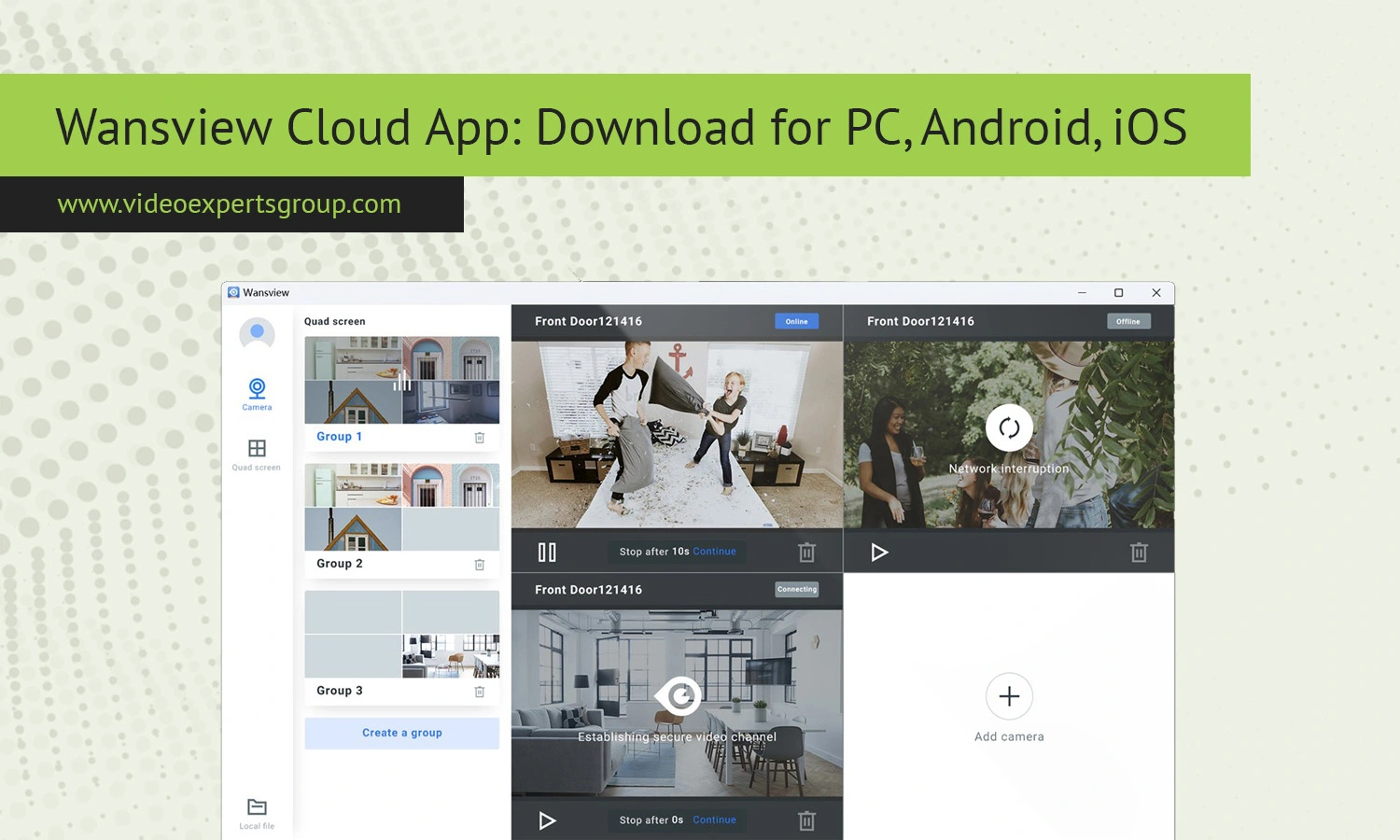
Modern home and business security systems are no longer limited to expensive professional installations. With Wi-Fi cameras, cloud storage, mobile notifications, and remote monitoring, users can now control their surveillance systems directly from a smartphone or computer. One of the applications often used for this purpose is the Wansview Cloud App.
The app is designed for managing Wansview security cameras, allowing users to monitor live video feeds, receive motion alerts, review recordings, and configure camera settings from almost anywhere. Whether you want to watch over your home, office, garage, pets, or elderly family members, the application provides a convenient remote surveillance solution.
In this guide, you will learn what the Wansview Cloud App is, its main features, how to download it for different platforms, and which alternatives may offer additional functionality.
What Is a Wansview Cloud App?
The Wansview Cloud App is a mobile and desktop-compatible application created for managing Wansview IP cameras and cloud-enabled surveillance devices. The software connects cameras to a user's account through the internet, making it possible to access live streams and recordings remotely.
Wansview is known for producing consumer-friendly indoor and outdoor security cameras with Wi-Fi connectivity. The app acts as the control center for these devices. Once a camera is connected to the application, users can monitor video feeds in real time, communicate through two-way audio, configure recording settings, and receive instant motion notifications.
The application supports various Wansview camera models, including indoor pan-and-tilt cameras, baby monitors, outdoor waterproof cameras, and smart home security devices.
Most users install the application on smartphones, but many also prefer using the platform on Windows PCs for larger-screen monitoring and continuous surveillance management.
Features
Live Video Monitoring
The app allows users to view real-time camera streams directly from their devices. This feature is useful for checking homes while traveling, monitoring children, supervising pets, or managing small business security.
Cloud Storage Support
One of the main advantages of the application is cloud storage integration. Instead of relying only on local microSD cards, users can store recordings online for easier access and backup protection.
Motion Detection Alerts
Motion detection notifications help users react quickly to unusual activity. When movement is detected, the app can instantly send alerts to the connected device.
Two-Way Audio
Many Wansview cameras include built-in microphones and speakers. Through the application, users can listen to sounds near the camera and speak remotely using the connected smartphone or PC.
Night Vision Access
The app supports cameras with infrared night vision, allowing users to monitor areas even in low-light or completely dark environments.
Remote Playback
Recorded footage can be reviewed remotely through the application. Users can search for events by date and time without physically accessing the camera.
Multi-Camera Management
The software supports multiple devices under one account. This makes it easier to monitor several locations from a single interface.
Pan and Tilt Controls
Compatible Wansview cameras can be remotely rotated through the app. Users can adjust viewing angles and monitor wider spaces without manually repositioning the device.
Wi-Fi Configuration
The app simplifies camera installation by guiding users through wireless setup and QR code pairing.
Encrypted Access
Modern versions of the app use encrypted communication channels to improve account and video security.
Download
PC/Windows
Although Wansview primarily focuses on mobile applications, many users prefer monitoring cameras from a desktop computer. A larger display provides better visibility for continuous surveillance and multi-camera viewing.
There are several methods to use the Wansview Cloud App on Windows PCs.
The first method involves using official Windows-compatible software if provided for the specific camera model. Some Wansview devices support desktop viewing software that can be installed directly on Windows 10 or Windows 11 systems.
The second method involves Android emulators such as Bluestacks or LDPlayer. These programs allow users to run the Android version of the Wansview Cloud App on a PC.
To install the application on Windows using an emulator:
- Download and install a trusted Android emulator.
- Launch the emulator and sign in with a Google account.
- Open the Google Play Store.
- Search for the Wansview Cloud App.
- Install the application.
- Log in to your Wansview account.
- Connect and manage your cameras.
Using the application on Windows is especially useful for security operators, small offices, retail stores, warehouses, and users who want continuous monitoring throughout the day.
Android
The Android version of the Wansview Cloud App is one of the most commonly used versions because of the popularity of Android smartphones and tablets.
Installation is straightforward:
- Download and install the application from the Google Play Store.
- Open the app and create an account or sign in.
- Add your Wansview camera by scanning the QR code or entering device details manually.
- Configure Wi-Fi settings and camera preferences.
After setup, users can access live video feeds, playback recordings, receive notifications, and adjust camera settings directly from their Android devices.
The Android version typically supports:
- Push notifications
- Cloud playback
- Multi-camera viewing
- Two-way audio
- Motion alerts
- Night vision support
- Remote PTZ control
Most modern Android devices running updated operating systems should handle the application without significant issues.
iOS
iPhone and iPad users can also install the Wansview Cloud App through Apple's App Store.
To download the app on iOS:
- Download and install app from the App Store.
- Launch the application after installation.
- Sign in or register a new account.
- Add your Wansview camera and complete the setup process.
The iOS version offers a user-friendly interface optimized for Apple devices. Features are similar to the Android version and usually include live monitoring, playback, motion alerts, cloud access, and remote camera control.
Many users appreciate the app's compatibility with iPads because the larger screen improves visibility when monitoring multiple cameras simultaneously.
Wansview Cloud App Alternatives
Although the Wansview Cloud App works well for basic home surveillance tasks, some users eventually require more advanced features, broader camera compatibility, enterprise-level management tools, or professional video surveillance integration.
One notable alternative is the VXG App.
The VXG App is designed for cloud video surveillance and supports a wide range of IP cameras from different manufacturers. Unlike many brand-specific applications, VXG focuses on scalability, flexibility, and centralized cloud-based monitoring.
Key advantages of the VXG App include:
- Support for multiple camera brands
- Cloud video management
- Remote monitoring from anywhere
- AI-powered analytics support
- Enterprise surveillance capabilities
- Secure cloud infrastructure
- Scalable deployment for businesses
- Mobile and desktop accessibility
The platform can be suitable for businesses, commercial facilities, multi-location monitoring environments, and users who want more advanced surveillance management than standard consumer applications provide.
Compared to simpler camera apps, VXG offers greater flexibility for professional security deployments while still maintaining remote access convenience.
FAQs
